Category Archives: Story telling

The current way of my blogging – Part 1

During the years, I slowly changed my way of blogging. I can just write about is, but I also want to add some thoughts about it. Welcome to my first State of the Blogging.

The first step was to put the whole blog post in a mind map on a mobile phone. I liked the auto complete typing. Then I copied all the text into a Word document.

Brewing blog posts

In the past I used the mind map intensively for blogging. I edited the first rough version with MindManager on my Android phone and then extracted the information with FreeMind on my PC.  Nowadays I use an iPhone and I could not find the right software, so I started blogging in Word right away. Like now.

The basic idea is still the same. I put little pieces of the blog post in a Word document. Then I expand the pieces to readable paragraphs. This is based on the Fieldstone method of Jerry Weinberg.

Most tech related blog posts can be quite boring with abundance of dry facts and tips. So, I tend to add jokes in the blog post. If I need to retrieve some information from a blog post, then it is easier for me to consume.

Nowadays, I put a rough overview of a blog post or serie of blog posts with similar theme into one Word document. In case of several blog posts, I split the overview in different parts. Yes, you are currently reading the first part.

Making it accessible

In the past I tried to make my blog posts better readable for other people. I added extra headings, so I had to add extra code for CSS or Cascading Style Sheets. I used the following code:

blockquote {
	color: black;
	padding-left: 5%;
	font-weight: 400;
}

h1 {
font-size: 20px;
line-height: 1.5;
}

h2 {
font-size: 18px;
line-height: 1.25;
}

h3 {
font-size: 16px;
line-height: 1.1;
}
Then I limited the size of the paragraphs. My thumb of rule is maximal 3 lines in Word, which leads to a reasonable paragraph in WordPress.

During editing, I tried to simplify the language, so a beginning engineer can understand my blog posts. Example: the previous version of the last sentence contained “to reduce the level of my language to a level of a beginning engineer”.

In one blog post I added a warning for people, who uses screen readers to read the text aloud. Most of the time it is tiring to listen to every period and comma in a sentence. So, a lot of people set the level of the screen reader to skip these characters. But this this is not handy, if source code is shown.

Bonus tip: I also used warnings for readers to avoid situation, which trigger things like anxiety.

Just checking

English is not my native language, so I try to use proper words. On the web I regularly asked for the meaning of a word. If I find a reference to urban language, then I need to change the text.

Fact checking on the web is also included in my blogging. Especially, if laws are involved. Luckily, they are published on the web. They are great link fodder.

Use the Source, Luke.

To be sure, I added a disclaimer, that I am not a legal expert.

Word offers spelling and grammar checks. I prefer to use English UK. There are a lot of people who like to speak Oxford English, but use American words or phrases. Yes, I am one of them.

Using open standards

A Word document cannot be copied and pasted on the Web. I prefer HTML, the language used to make web pages. Then I store the Word document with the option ”Web page (filtered).”.

To be continued.
Advanced blogging – Unfamiliar Quality Attributes

What would be a good opening for this blog post?

  1. Content is king!
    Narrator: “It is used so much, that it is boring.” [Sigh]
  2. Meta blogging is blogging about blogging.
    Narrator: “Now you lost me.”
  3. It took Thrisha Gee months to make a good video of 20 minutes. I had screenshots of 20 minutes of testing. Now I fully understood her.
    Narrator: “Tell me more.”

My favourite opening for this post is the last one.
But I am too late. I already started with a rethorical multiple choice question.

Some stats

In the past months I made 2 blog posts with lots of pictures, so I had some experiences how to deal with this case.
This time it was 3 days, 3 takes, and 26 pictures.

Performance

Let me do some calculations. 26 pictures of the screen with a size of 288 kb would make an 8 Mb post. This is not what my readers are waiting for. Downloading!

I was experiementing with the number of posts on my home page and following pages. This would reduce the number of pictures on 1 page significantly. In WordPress it looks like this:
After selecting Settings and Reading there is an option to set blog pages show at most to 3 posts!

The story is, that mobile friendly web sites had a major impact on SEO or Search Engine Optimalisation. If a user can view the website fast enough on his or her mobile, then the search engine will place it high in the list of search results.

Accessibility

For deaf people and people with bad hearing there were no obstacles on my blog. I did not use any movies. Let me describe a scene of a closeup of a face in 3 ways:

  1. No options used.
  2. Undertitles
    [Typing sounds]
    [“What are you typing?”]
    [“I saw something strange.”]
  3. Closed captions
    [Face of a programmer is shown.]
    [Tester is typing on the keyboard]
    [Programmer: What are you typing?”]
    [Tester: “I saw something strange.”]

If I will add a movie, then I really like to use the closed captions.

In the past I used cursive font, but this is bad for people who are visually impaired or have a bad view. So I stopped using it.

I even increased the contrast of my quotes.

This is a quote with a good contrast.

For programming dark mode is quite convenient for visually impaired people. White characters on a black background are more readable than black characters on a white background.

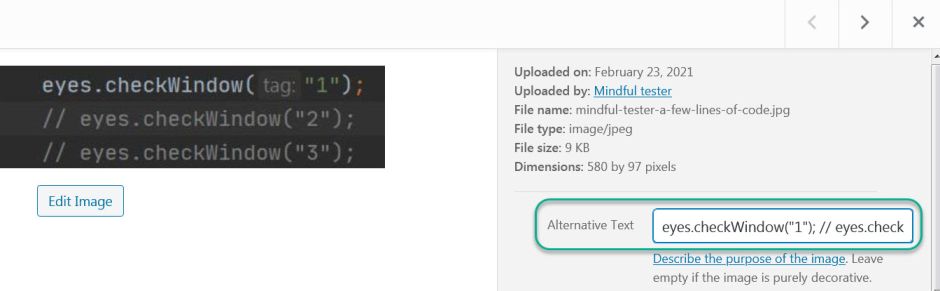
Blind and visually impaired peoplemight  have or might have problems with text in a picture. An image cannot be read aloud by a screen reader. I could add an alternative text to the image.
The visible part of the alternative text of a picture of 3 lines of codes with 2 comments is: "eyes.checkWindow("1");// eyes.check"!

The screen reader could read it aloud, but the whole structure of the code would be gone. Several lines of code are spoken as a single line of code. This is confusing.

eyes.checkWindow("1");// eyes.checkWindow("2");// eyes.checkWindow("3");

could be interpreted as:

eyes.checkWindow("1");
// 
eyes.checkWindow("2");
// 
eyes.checkWindow("3");

So I used the pre tag of HTML to display the code in a proper way using the code editor:

<pre>eyes.checkWindow("1");
// eyes.checkWindow("2");
// eyes.checkWindow("3");
</pre>

Now I had to find an efficient way to include 26 pictures  with alternative texts for a single blog post.

Enjoyability

My target audience was programmers who know the basics of Java and an IDE or Integrated Development Environment.
I also counted on the fact that they had the tools properly installed. This is described in other places.

For me a story is more enjoyable to review than a set of instructions. This spreadsheet blog post contains a set of boring instructions.

It was a challenge to stop myself to turn the new blog post into a set of pictures. Another way of boring.

Was there a way to add some humour to it?

Coming up

In the next blog post I will focus on reducing the size of the blog post.

Find The Monster In The Room

One evening in the winter I was having a dinner. People enjoyed their meal and there was a lot of talk.

The mood
was good.

Then the youngest child shrieked of panic. All talk stopped.

The first steps would be like: go to the bedroom and put on the light.

Everyone at the dinner table looked at the kid a few meters away. The kid was in the same room.

The mother said that the kid had seen something. She went to the little child and tried to talk about it. This was difficult, because the kid knew only a few words.

The mother looked in the direction of the fearful eyes and saw nothing strange.

Back at the dinner table she told a story about curtains with triangles which looked like eyes to another little kid.

The second shriek was handled in the same way. The mother went to comfort the child. While looking for the source of fear.

The 3rd time an adult was with the frightened child within a second. The person lowered the head to the same height of the kid and looked carefully.

A machine showed some scrolling text. It was like the pupil of an eye looking for …

One of my kids asked: “Can I draw out the power cord?”
My answer was: “Yes.”
This was immediately followed by a familiar sound.
The display went blank.

Earlier that evening there was a power outage. The machine was switched on and had no current time. So it politely asked to set the proper time and scared a little child.

Some readers might remark, that this blog is about IT and  testing.
My answer is: “Yes”.

My New Year’s resolution is to Find The Monster In The Room.

Now I gave it a name.